
 Image 1 of 1
FEATURES
Instant estimates, your numbers The calculator uses your garment costs, your print rates, and your quantity breaks — not generic placeholders. Every estimate reflects how your shop actually prices.
Quantity price breaks built in Set tiered rates for any volume ranges you want. The calculator automatically applies the right rate as quantities change.
Per-location ink color counts Customers specify how many ink colors per print location — front, back, sleeves, wherever you print. The estimate accounts for all of it.
Pre-filled quote emails When a customer clicks Send, their default email app opens with every detail already filled in: garment, sizes, locations, ink counts, notes. You get clean, complete quote requests.
Locked to your domain The embed only runs on your website. It won't work if someone copies the code to another site.
No monthly fees. Ever. One purchase. You own it. Nothing to subscribe to, nothing to renew.
HOW IT WORKS (3 steps)
Step 1 — Configure After purchase, you'll receive a link to a private setup page. Enter your shop name, quote email address, garments, print locations, and pricing. A live preview updates as you type.
Step 2 — Download When your calculator looks right, click Download. You'll get a single .html file — that's your embed.
Step 3 — Install In Squarespace, add a Code Block to any page. Open the file in a text editor, copy everything, paste it in. Publish. Your calculator is live.
Total time: about 20 minutes.
WHAT'S INCLUDED
Self-serve setup page (configure, preview, download)
Single-file embed, ready for Squarespace Code Block
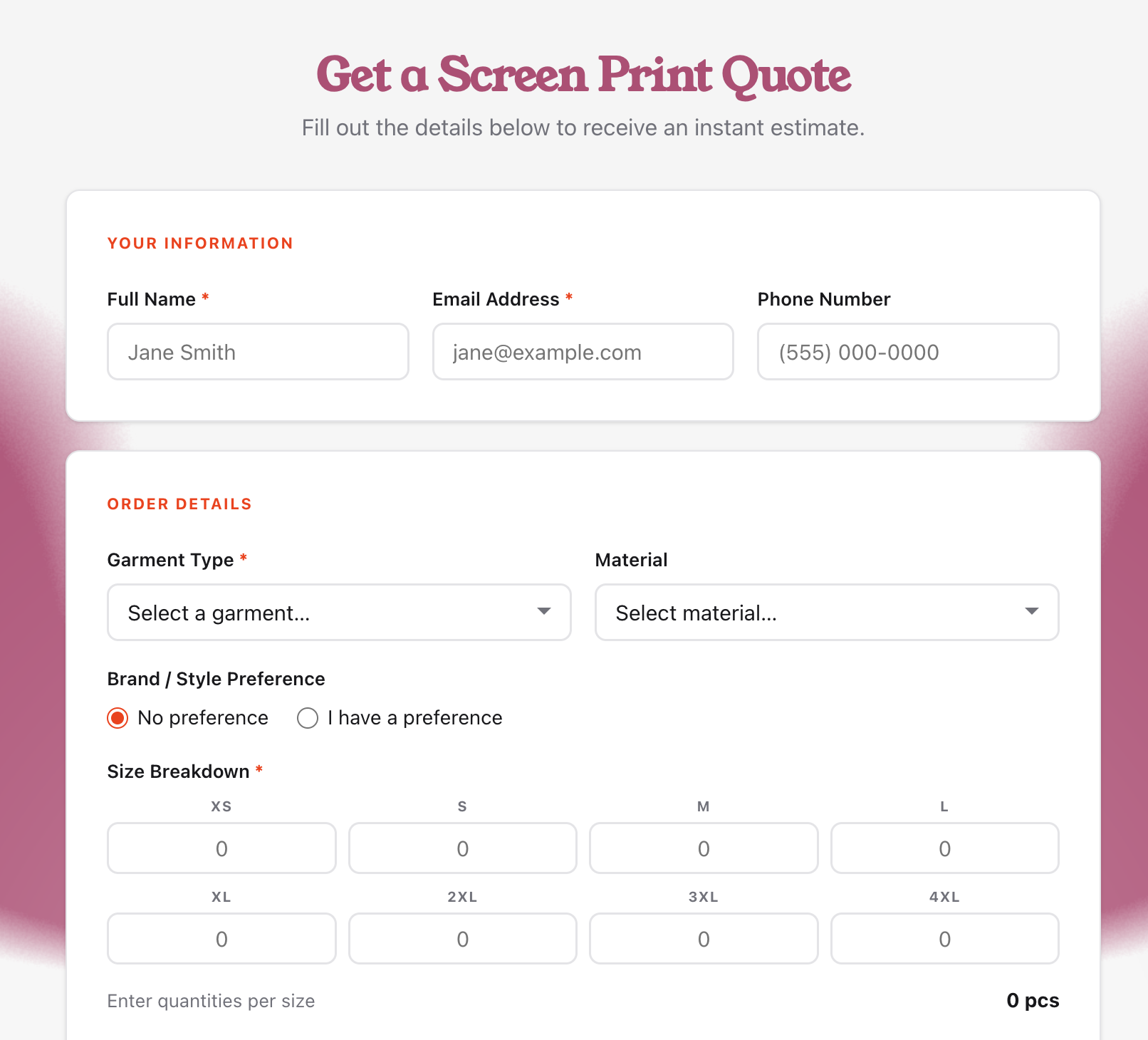
Garment selector with base costs
XS–4XL size breakdown grid
Print location selector with per-location ink color counts
Material selector (Cotton, 50/50, Tri-Blend, Other)
Brand/style preference field
Garment color swatches + custom color field
Quantity price break tiers (fully customizable)
Live estimate with line-item breakdown
Pre-filled mailto quote request
Domain lock (runs on your site only)
Squarespace install instructions included
FAQ
Q: Do I need to know how to code? No. The setup page walks you through everything with labeled fields and a live preview. Installing it requires pasting a block of code into Squarespace — full written instructions are included.
Q: Which Squarespace plans does this work on? Any Squarespace plan that supports Code Blocks — that's Business and above. If you're on a Basic plan, you'll need to upgrade to add custom code.
Q: Can I change my pricing later? Yes. Go back to the setup page, update your numbers, download a new file, and replace the old one in your Code Block. Takes about five minutes.
Q: Does this integrate with my Squarespace store or booking system? No — it's a standalone estimator. When a customer submits a quote request, it opens a pre-filled email. You handle the quote conversation from there, same as you do now.
Q: What if my pricing is more complex than what the calculator supports? The calculator handles garment cost, per-screen print rate, screen setup fee, and quantity break tiers. If your pricing has significant additional variables, this may not be a fit — feel free to reach out before purchasing.
Q: Is this a subscription? No. One payment, yours to keep.
Q: Can I use this on multiple websites? The embed is domain-locked to one domain. If you need it on multiple sites, purchase one copy per domain.
Q: What if I need help installing it? Written instructions are included. If you get stuck, email [your contact email] and I'll help you get it working.